What is Spring?

The Spring Framework is a powerful Java framework Includes a 
collection of programming and configuration models aimed at simplifying 
the development of Java-based applications and models aimed at simplifying the development of Java-based applications.
In other word Spring framework provides comprehensive infrastructure support for developing Java applications

Mentioned below are some of the modules can Significantly reduce the development time of an application.

  • Spring JDBC
  • Spring MVC
  • Spring Security
  • Spring Test

For example, we needed to write a lot of boilerplate code in the early days 
of Java web development to insert a record into a data source. However, by using the Spring JDBC Template, we can reduce it to a few lines of code with just a few configurations.

WHAT DOES THE SPRING FRAMEWORK DO?

  • Allows programmers to concentrate on the business logic rather 
    putting more effort on configuration. 
  • The key feature is the management of dependency, which provides 
    excellent interfacing with external frameworks by adding layers to them.
  • Enables testing as it allows us to write decoupled code.
  • Allows for inversion of control, through dependency injection.

What is Spring Boot?

Over the past few years, the Spring framework has become increasingly complex due to added functionality. To start a new Spring project, it requires a lengthy procedure.

Spring Boot was introduced to avoid starting from scratch and save time. This uses as a foundation the Spring framework.

In other words spring Boot is basically an extension of the Spring framework that 
eliminated the configurations of the boilerplate needed to set up a Spring application.

ReactJS

WHAT IS REACTJS?

React is a JavaScript library for building fast interactive user interfaces

WHY LEARN REACTJS?

  • React is the most popular java script library
  • There’s a ton of learning resources for ReactJS. 
  • You can easily integrate React components into legacy code. 
  • Components can be reused and can be nested for easy application composition. 
  • The Virtual DOM is extremely efficient at rendering web applications
  • It allows complex UIs to be composed from small and isolated 
    pieces of code called “components.”

NOW LETS CREATE A SIMPLE REACTJS!

Note: I suppose you’ve already set up a NodeJS environment.
Let’s install or update the latest version of npm first.

STEP : 1

First, we’re going to install a tool, Create React App, that will allow us to create our first React project, Open up your working directory in terminal and use the commands as follows:

>>mkdir titan_React_demo
>>npm i -g create-react-app create-react-app node package sets up the React project )

STEP : 2

Create your project

Navigate to the root directory of your project and create a new React 
project:

>>npx create-react-app first-react-app

STEP: 3

Awesome, you can start your project now

>>cd titan_React_demo 
>>npm start

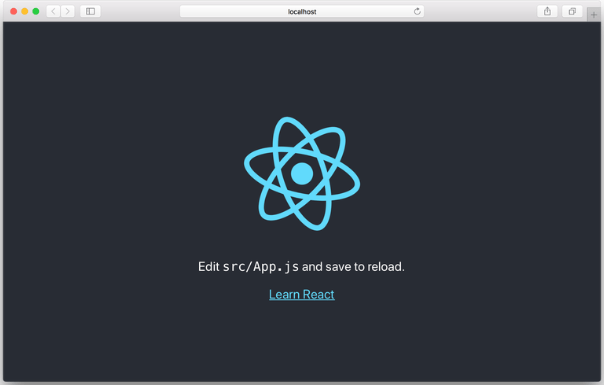
Your default browser should launch automatically, and you should get a screen like this:

RESTFul Web Services & and expressJS

Firstly,What do we mean by Web services?

Web Services are client and server applications that communicate over the World Wide Web’s (WWW) Hypertext Transfer Protocol (HTTP). In other words its simply a ‘method’ or ‘function’ in a normal programming language, except you are calling it over the internet.

For example:
Lets say you are creating a website that shows weather information of cities. You can actually get the data for the cities for already exposed web services. You will get the response in form of XML or JSON, you can parse it and show it on your website.

Okay now what meant by RESTful web services?

A RESTful web application shows information about itself in the form of
resource information. It also allows the customer to take action on these
resources such as creating new resources (example- creating a new user) 
or changing existing resources through HTTP verbs

Resources – They describe the “things” that a client may want to pull from a server 
(e.g. documents and files that make up a web page).

HTTP verbs- Which are the web verbs — they describe the “actions” you can take on a resource, such as GET, POST, PUT, and DELETE.

Application program interface (API) – HTTP requests to GET, PUT, POST and DELETE data.

Now Lets Discuss what is express JS?

It is a web framework that allows you to structure a web application in a specific url to handle multiple different http requests. 

Express is a flexible framework for Node.js web apps designed to make it much easier to develop websites, web apps, and APIs.

Why use expressJS ?

Basically, You can use few lines of codes with express JS to do a complex task with ease and also supports multiple templating engines to simplify generating HTML.

example: Express helps you with route support to respond to requests so you can write responses to specific URLs

How to Install & use Express ?

You can simply get it through NPM as follows:

>>npm install express

MongoDB for beginners

First lets try to undertand what is NoSQL?

NoSQL Database is used to refer a non-SQL or non relational database.

It provides a mechanism for store and receive data other than tabular relations model used in relational databases. In other words ,NoSQL database does not use tables for storage of data. It is generally used to store big data and real-time web applications.

Now what is MongoBD?

MongoDB is a NoSQL(Not only Structured Query Language) database program, which is cross-platform document-oriented. It is an open source database management system, which supports various forms of data.

Its useful in big data applications that deals with  large volume of data and also for the processing of unstructured data.The architecture of MongoDB consists of collections and documents. It uses document storage BSON format (binary form of JSON).

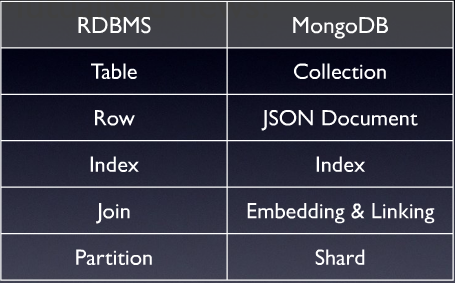
MONGODB VS RDBMS
  • RDBMS has a database of relations, but MongoDB has a database of non-relations
  • We need to design the table in RDBMS and then only we can only start coding, 
    but we can start coding directly in MongoDB.
  • RDBMS supports SQL language where as MongoDB supports both SQL as well as JSON query language.
  • RDBMS is based on tables and rows and MongoDB is based key-value and documents .
  • Compared to MongoDB unstructured data, RDBMS processes data very slowly.
  • MongoDB is horizontally scalable, where as, RDBMS is vertically scalable.

GIT

HERE IS A SIMPLE GUIDE FOR GIT 🙂

Git is a version control system, which makes it easier to track file changes. 
For example, git can help you determine exactly what has changed, who has changed it, and why when you edit a file. It’s useful when coordinating developing a program with a team of people on a project, and for tracking progress.

GIT Terminologies

Repository : Central location where all of the files are stored. 

Trunk : This is where the most stable code is placed which is called as the production code. ( Also known as master branch)

Stage : Mark files for tracking changes.

Commit : Creates a snapshot of the file changes that are made.

Merge: Combine branches together to update the master branch.

Checkout : Obtain file for changing.

Branch : Copy of the branch master taken at a particular point. All developments in 
features and corrections of bugs will be done in a branch. Usually multiple branches are allowed at the same time.

Merge conflict : It happens when a file that has been changed in two separate branches or 
places is combined. Changes interfering with other changes.

JavaScript

WHAT IS JAVASCRIPT?

JavaScript is one of the world’s most popular programming languages for web,  As a web developer, you can use JavaScript to build web and mobile apps, real-time networking apps and games. JavaScript is used mainly to make web pages more lively and interactive

WHAT CAN JAVASCRIPT DO IN A WEB PAGE?

  • Scripts gives a programming tool to HTML designers
  • JavaScript can put dynamic text into an HTML page
  • JavaScript can react to events
  • JavaScript can read and write HTML elements
  • JavaScript can be used to validate data
  • JavaScript can be used to store and retrieve information on the visitor’s computer (Cookies)
  • JavaScript can be used to detect  the visitor’s browser
  • A JavaScript can be used to detect the visitor’s browser-load a specific page designed for that browser.